There are different ways to change the Power Query Date Format for Microsoft Excel or Power BI: an indispensable task for data analysis and Business Intelligence. Find out everything you need to know!
When collecting data from different sources, it’s not uncommon to be confronted with dates in different formats. This can cause problems. That’s why date formatting is an important aspect of data analysis. By performing this task correctly, analysts can better understand temporal trends and improve the relevance of their results.
However, this process can be tedious and time-consuming. This is particularly the case with large datasets. Fortunately, with Microsoft Excel and Power BI, the Power Query data transformation tool makes it easy to change date format. Just follow the guide!
What are the different types of date formats for Power Query Date Format?
To begin with, to understand the importance of date formatting and the Power Query Date Format, we need to go back over the different formats that exist. We’re used to the DD/MM/YYYY format, typically used in Europe. In the USA, however, the date is traditionally expressed in the order MM/DD/YYYY.
In addition to this regional difference, there are also standards for date formats. For example, ISO 8601 expresses the date as YYYY-MM-DD. It is used in a variety of contexts, including data exchange between computer systems. However, when data is analyzed, it must be converted to the same format. Otherwise, errors may occur.
The Power Query tool allows Microsoft Excel and Power BI users to format dates in a variety of ways. Here’s how it works. First, you need to import data containing dates into Power Query. Then select the date column to be formatted, right-click and choose “Change type”. In the drop-down menu that appears, simply select “Date” and choose one of the predefined formats offered: DD/MM/YYYY, MM/DD/YYYY or YYYY-MM-DD. Click on “OK” to save your changes.
How do I create a custom Power Query date format?
If these predefined formats don’t meet the user’s needs, it’s also possible to create customized formats with Power Query. The first step is to click on the date column to be formatted, then on “Add Column”. Then select “Custom column” from the drop-down menu. A “Formula” dialog box then opens, and the user can enter the formula for the desired date format.
For example, to express the date in “DD/MM/YYYY” format, the appropriate formula is “=Text.Day([Date])&”/” & Text.Month([Date]) &”/” & Text.Year([Date])”. Once the formula has been entered, click on “OK”. This saves your changes.
Power Query Date Format and the main date format problems
Power Query and the main date format issues However, users may encounter a number of problems. Firstly, datasets can sometimes contain missing dates. It is then necessary to add a column to fill the gaps with a default value.
Similarly, some dates may be invalid. This is the case for dates prior to 1900 or after 9999. To overcome this problem, the solution is to exclude these dates or replace them with a default value. Another frequent problem is confusion between the various date formats. For example, if data contains both DD/MM/YYYY and MM/DD/YYYY dates, this can cause errors. It is therefore essential to ensure that formats are consistent across all data.
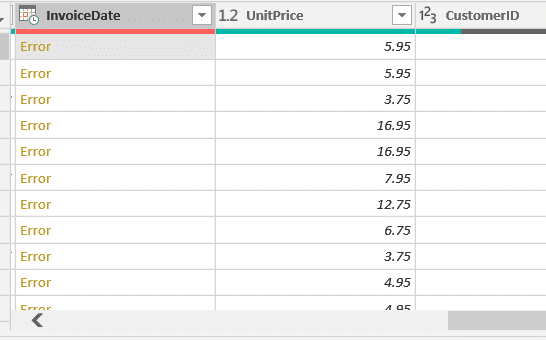
To avoid problems and make the most of the data at their disposal, Power Query users can follow these few tips.
Firstly, make sure you use standardized date formats as often as possible. This ensures consistency, and facilitates interpretation by other computer systems or applications. On the other hand, don’t hesitate to customize date formats to meet specific needs or requirements. Depending on the context, it’s important to know how to choose the best of these two options. Before proceeding with the analysis, check carefully that formats are heterogeneous within the dataset. This helps to avoid formatting errors.
Last but not least, efficient and scalable date formatting workflows can be created. This saves time and energy when processing large quantities of data!
Conclusion: Power Query simplifies date formatting, provided you know how to use it
This article has shown you how to use Power Query for date formatting in Excel, Power BI and other software compatible with this data transformation tool. However, in order to exploit all the possibilities offered by Power Query, it is necessary to learn how to master it. This is precisely what Liora offers with its Power BI training course.
In this course, you’ll learn how to use Microsoft’s Business Intelligence platform and its many features to collect and analyze data and create rich, interactive dashboards. This course is divided into two parts. The first part, designed for beginners, covers 24 hours over three days, and includes an introduction to Power Query and the DAX language. The second part lasts 14 hours over 2 days, and is designed to deepen your understanding of the tool. In addition to discovering the subtleties of DAX and Power Query, you’ll also learn advanced concepts such as DataFlows and incremental updating. In all, the program lasts 38 hours and can be completed in 5 days.
Depending on your level and needs, you can take the whole course or choose one of the two parts. By the end of the course, you will have fully mastered Power BI and Power Query. As a Microsoft Certified Trainer, our organization will accompany you through the Microsoft PL-300 exam and the Power BI Data Analyst Associate certification! All our training courses are delivered entirely remotely via the Internet, and are eligible for funding options. Discover Liora!
Take your future into your own hands. Choose your desired start date, and begin your application by filling out the appointment form.
Bootcamp
Tuesday 5 May 2026
Analytics Engineer
Remote
English
Bootcamp
Tuesday 7 July 2026
Analytics Engineer
Remote
English
Bootcamp
Tuesday 8 September 2026
Analytics Engineer
Remote
English
Bootcamp
Tuesday 3 November 2026
Analytics Engineer
Remote
English
Upcoming starting dates
Take your future into your own hands. Choose your desired start date, and begin your application by filling out the appointment form.
No upcoming dates
THE TEaM
They won’t leave until you land your dream job and celebrate with you 🍾
Liora is more than a training. It’s a whole team walking forward with you, step by step, until you get hired. Mentors, coaches, instructors… all committed to your success.
Estelle
Career Associate
Vincent
Career Associate
Magali
Career Associate
Bilal
Career Associate
Kahina
Career Associate
THE SUPPORT
Support built for your success
Our structured support and expert training open real career opportunities in data, cyber, and tech.
Premium resources just for you
A private platform with exclusive insights on market shifts and career strategy.
A Slack space to log in, ask questions, and grow with fellow learners.
Stay updated with expert tips on trends, events, and career moves.
Individual career coaching, tailored for you
From day one, our Career Team supports you with personalized coaching. We help you:
Shape your career path around your goals and experience.
Find the right opportunities and fine-tune your job search strategy.
Get personalized advice to level up your job hunt.
High-impact career workshops
Our expert-led group sessions help you prepare for the job market: from polishing your CV and LinkedIn to nailing interviews, building a smart job search strategy, crafting your pitch, and building your network.
A strong network that opens doors
We connect you with recruiters through job fairs, speed-dating sessions, and curated industry events.
The impact of our support in numbers
52k€
Average gross salary of our alumni
Real proof that our programs lead to high-quality, high-paying jobs in data, tech, and AI.
9.53/10
Satisfaction for individual coaching
With 1000+ coachings delivered each year, our live support gives you direct access to industry experts to ask, unblock, and accelerate your job hunting process.
9.1/10
Satisfaction for group workshops
Hands-on sessions that help you improve your CV, LinkedIn, interview skills, and job search strategy.
71%
Employment rate
within 6 months of graduating a clear sign of how effective our training and career support really are.
70+
career-focused workshops every year
covering key topics like employability, networking, career transitions, and personal branding tailored to every learner.
4
recruitment fairs per year
Whether online or in person, these exclusive events create real connections between our talent and recruiters.
They benefited from our Career Support
Great Training Bootcamp! Thanks to the way Datascientest teaches and the constant support provided by the teachers, I was able to get the practical da…
James
I learned a lot in the program it is really an amazing platform to grow with your career and start with potential. I really felt helped and received a…
Rajini Sharma
I am really amazed by the human quality of the Hack A Boss team, Selene, Dmitry, Pablo and Daniel are amazing people who are willing to help and teach…
Simon Cariou
I recently finished my Bootcamp for Data Analyst and I am very happy with the knowledge I gained and experience it gave me. The modules were very clea…
Matea Mutz
I find this platform is the best because it's an intelligent way of learning in this era, just text content plus some needed short tutorial videos. al…
Ahmed
I am really amazed by the human quality of the Hack A Boss team, Selene, Dmitry, Pablo and Daniel are amazing people who are willing to help and teach…
Lautaro Martinez
Just finished training yesterday (3 + 2 days). Group interactivity was effective, the instructor was very responsive. His experience in business as co…
Stéphane Bourain
Finance Controller
I would like to share with you a great experience lived recently by following "Data Analyst Training". I have learnt lots of skills (Python, Data Anal…
Khalid
Very high-quality training. Thank you for the presentation. I strongly recommend this training provider. It covers nearly all the key aspects needed t…
Mohamed Haijoubi
Data Engineer
I completed a Data Engineer training program at DataScientest, and overall, the course is well-structured — a balanced mix of projects, theory, and …
Moustafa B
SRE Lead
Now certified and very satisfied with the Data Scientist training, I’ve decided to continue my journey with DataScientest by enrolling in the MLOps …
Alexandre L
An excellent training provider for Data-related careers. The courses are well-designed, and you’re quickly challenged through exams after each modul…
Rémy
The training offers a solid overview of various Machine Learning techniques, and access to a wealth of content — including coaching sessions, alumni…
Anonymous
The bootcamp program is really intensive, specially for a person who has no programming background, but the course is definitely worth it. It helped m…
Shiva
As part of my career transition, I pursued my DevOps training through a work-study program at DataScientest. I chose to follow both courses with DataS…
Nicolas Utter
Content Creator
Awesome education, awesome people.
Alexander P
I'm delighted to share my experience with this bootcamp! After completing my bachelor's degree, I was searching for a way to work with computers and d…
Dotun Olujide
A lot of things to learn and a lot of information! was an amazing experience.
Tiago R
I’d like to share my feedback following the high-quality training I completed on Microsoft Power BI, delivered by DataScientest. This experience was…
Anonymous
Excellent course with practical focus! Really enhanced my data science skills, directly applicable to my research. Highly recommend DataScientest for …
Lina Livdane
Overall impression is good. The course content is well-organized, thoroughly designed and challenging as well. In the end, I believe I am well-prepare…
Khoa Tran
I really enjoyed the course material and the fact that everything was remote. Well I haven’t finished the MLOps part yet. The data science part was …
Marius
Onboarding was smooth & lessons on your own & remote were particularly adequate to me
Clément Dué
Loved the format which was perfect for me – as a young parent. Additionally, I found the resources (platform) to be very good, and the instructors to …
Christian Müller
AI Scientist
I successfully completed my Data Analyst training last month and was very satisfied — within just six months, I was able to learn the key fundamenta…
Henry
Angelika Tabak
DataScientist.com is always interested in maintaining a good reputation and producing good graduates. But don’t be afraid, the instructors are very …
Baris Ersoy
PL/SQL Developer
I’m really glad I chose DataScientest. Balancing work, family, languages – and now data – learning is challenging, and their flexible format makes i…
Debora Ferreira
Probably the best Data & AI training course out there. Loved the structure, depth and hands-on approach of the Data Science & MLOps course. I …
Benjamin S.
Data Scientist
The content of the module undoubtedly covers the most important aspects of Machine Learning and MLOps. The final project allows you to put into practi…
Darwin Oca
As a seasoned software engineer with many years of experience, I was looking to refresh my IT skills and deepen my knowledge in data-related technolog…